Partselerate — unifying aircraft parts management for United Airlines

Replaced 20+ disconnected tools across four maintenance teams with a single, cohesive ordering and tracking platform.
Role
Lead Designer
Product type
Enterprise B2B
Timeline
Jan 2023 - Sept 2026
MacBook mockup
01 - the context

Creating a unified solution for parts ordering

Every day, United's aircraft controllers work against the clock to source and deliver hundreds of parts worldwide — juggling inventory tracking, finding the fastest shipping options, and navigating complex rules based on part type, location, and urgency, all while coordinating across time zones to keep aircraft in service and avoid costly delays.

Four teams handle sourcing for aircraft maintenance parts. While they share the same goal — getting the right part to the right place at the right time — each relied on different tools, workflows, and processes, creating inefficiencies and making an already demanding job even harder.

I led UX/UI design end-to-end — from lo-fi wireframes through hi-fi, prototyping, and stakeholder presentations. I worked alongside a UX researcher, collaborating closely on synthesis and participating directly in user interviews to ensure the design was grounded in what we heard.

02 - the users

Four distinct users — all sharing the same goal but working in fundamentally different ways.

We interviewed users with varying levels of seniority and experience across the four teams, gathering insights 
into where the groups overlapped and diverged in fulfilling part requests. The insights we gathered started to help inform our next steps forward for unifying the experience.
The findings helped us craft four distinct user archetypes:

AOG Controller (OOS)

Manages aircrafts that are out of service due to unexpected issues. 

  • By individual part
  • Source parts for aircrafts and engines
  • Ship parts based on the fastest arrival time


“I want to get the parts to the OOS aircraft as quickly as possible.”

AOG Controller (Scheduled)

Manages planned mtx or repairs for aircrafts.

  • Assigned fleet type
  • Source parts 24-48 hours in advance
  • Ship parts to arrive within hours of the scheduled mtx


"I want parts to arrive at the scheduled station a few hours before maintenance begins.”

AOG Controller (Deferrals)

Manages planned aircraft mtx that has been deferred to a later date.

  • Assigned fleet type
  • Source parts 24-48 hours in advance
  • Ship parts to arrive within hours of the scheduled mtx

 
"I want to deliver parts to the scheduled station to prevent an OOS event.”

Base Controller

Manages major aircraft repairs at designated vendor mtx bases.

  • Assigned station
  • Source hundreds of parts per aircraft
  • Ship parts two weeks in advance of the scheduled mtx


“I want all parts at the scheduled station 14 days before the scheduled maintenance begins.”

03 - the problem

"I have to check three systems just to know if the part exists. By the time I've found it, the window to get it out on time is already closing."

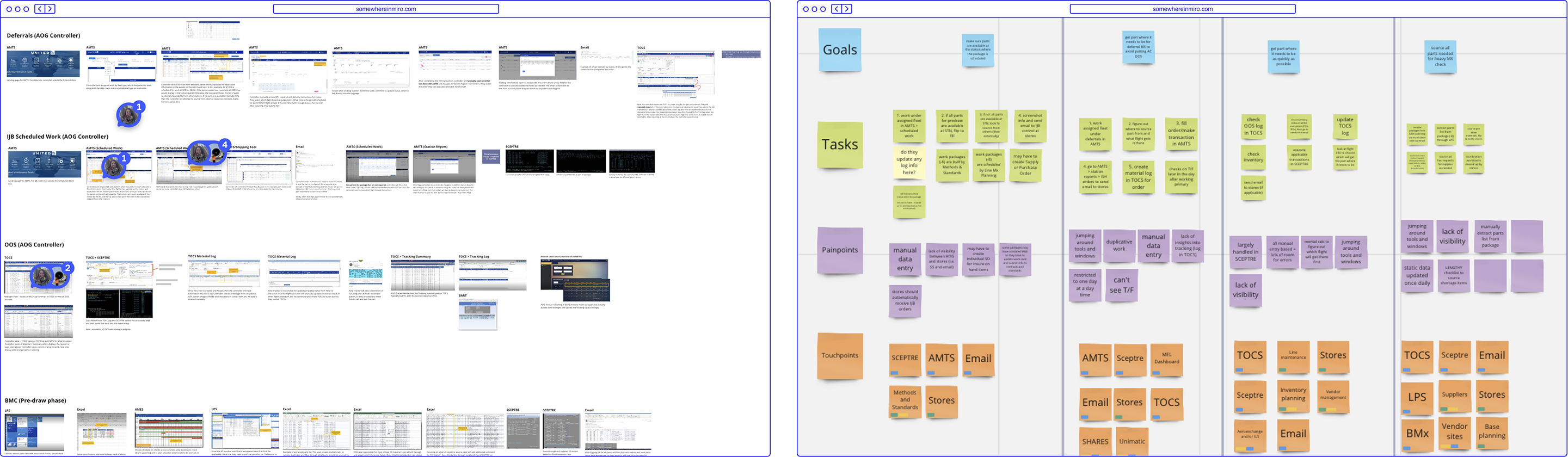
One of many poignant quotes we heard while conducting discovery interviews. Through a combination of requirement stakeholder interviews and observational sessions with controllers across all four operational teams, we uncovered three compounding problems that affected all user groups. The business problem was clear: delays in parts procurement directly impact aircraft availability, which has measurable cost and safety consequences.
Dashboard mockup
problem  1

No visibility across systems

No unified view of inventory, order status, or shipment progress — hard to know where any part was in the pipeline.

problem  2

Manual, duplicate data entry

Same data entered across multiple platforms, leading to inconsistent records and traceability issues.

problem  3

Multiple tools per order

A single order required switching between systems for inventory checks, order placement, and delivery tracking.

04 - the opportunity

Pinpointing where we could streamline processes

The key insight from research: while the four teams had different priorities, urgencies, and workflows, the underlying job was identical: find a part, confirm availability, get it moving, track it to arrival. The variation was in data fields, filters, and timing — not in the fundamental flow. A single tool was feasible. Three opportunities shaped how we built it.
Dashboard mockup
opprotunity 1

One cohesive experience

Consolidating all applications into one tool with a role-adaptive interface would eliminate context-switching, standardize workflows across teams, and create a single source of truth for every parts order.

opprotunity 2

Real-time part visibility

Integrating with bag and cargo systems would give controllers end-to-end visibility from the moment a part shipped to the moment it arrived. Thus enabling proactive intervention when parts were delayed rather than reactive scrambling when things went wrong.

opprotunity 3

Automating routine decisions

A significant portion of parts orders were routine: standard parts, available stock, predictable routing. Automating these would free coordinators to focus time and attention on the complex, high-stakes exceptions that actually required human judgment.

05 - the design process

From whiteboard sessions to validated wireframes

Defining the mental model

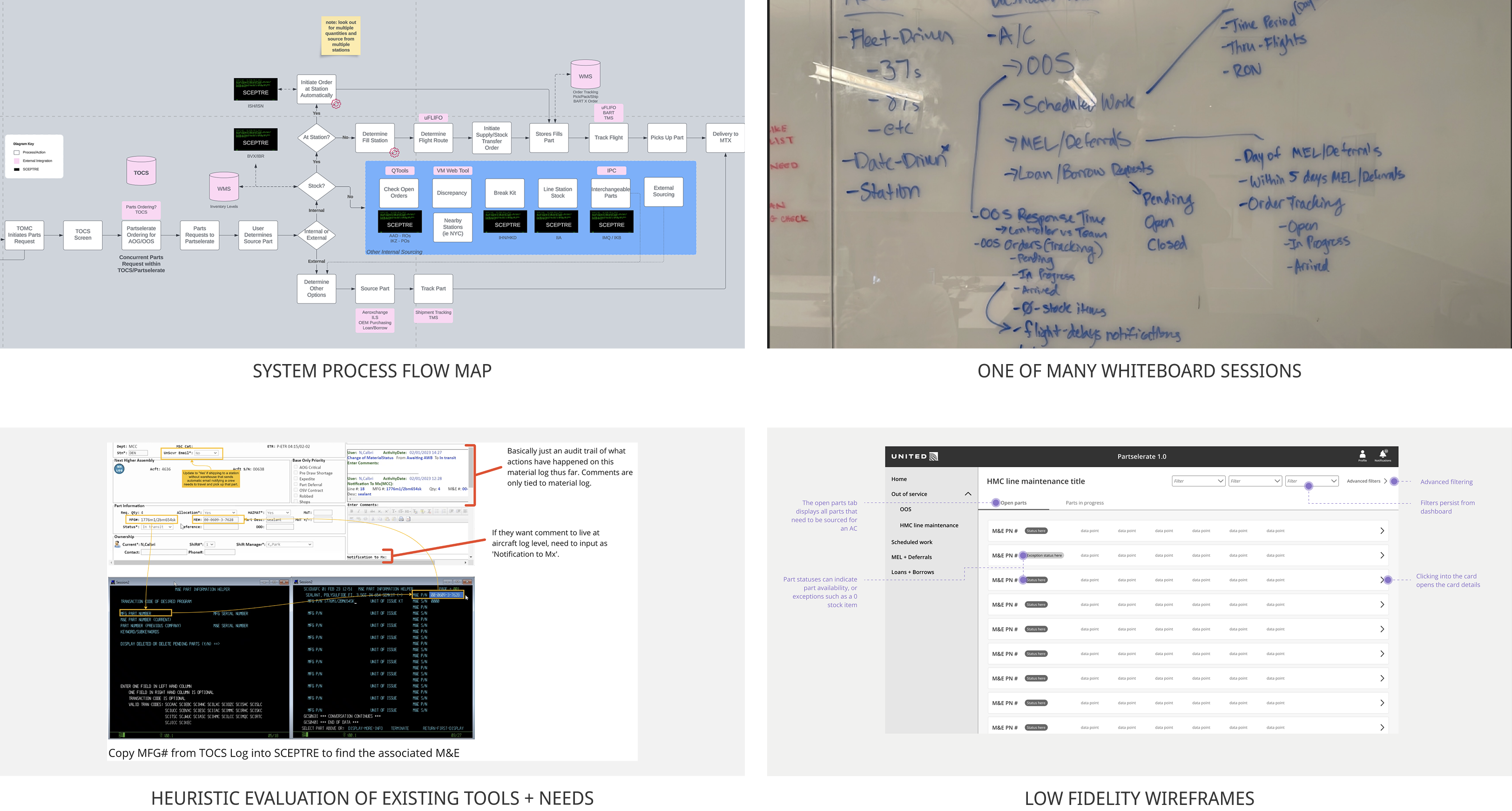
The first challenge wasn't visual, it was conceptual. Controllers think in two competing ways: some organize their work around individual parts, others organize around aircraft. Both are valid, and both needed to work within the same tool.

Whiteboard sessions with researchers and analysts helped us map the decision points for each team. What data they needed, what actions they took most frequently, and where the handoff points between teams were. These sessions surfaced that tension explicitly, and the aircraft-first hierarchy we ultimately designed around was a direct result of that conversation.

three rounds of Low fidelity wireframes

I structured three rounds of wireframes with stakeholders and product champions around a specific question each time, rather than a general review:

Does this flow match how controllers actually think about a parts request?
This round exposed that our initial queue structure was too part-centric. Controllers needed to start from the aircraft, not the part.

Where does the experience break for specific teams?
Base controllers, who manage hundreds of parts per aircraft weeks in advance, needed different default views and filtering behavior than AOG controllers working in real time.

Does this feel like one tool or four tools stitched together?
Terminology was the last battleground. Four teams used different words for the same concepts. Aligning on a shared language was as much a design problem as a layout one.

Usability testing

Hi-fi prototypes were tested with participants from each maintenance team in 45-minute moderated sessions. The core flow validated well — the three-step order process required no structural changes. Feedback concentrated on two areas: language (confirming the terminology problem from round 3 wireframes) and edge cases around parts with no available sourcing options, which we hadn't fully designed for. Both were addressed before handoff.

06 - the solution

Putting it all together for one unified solution

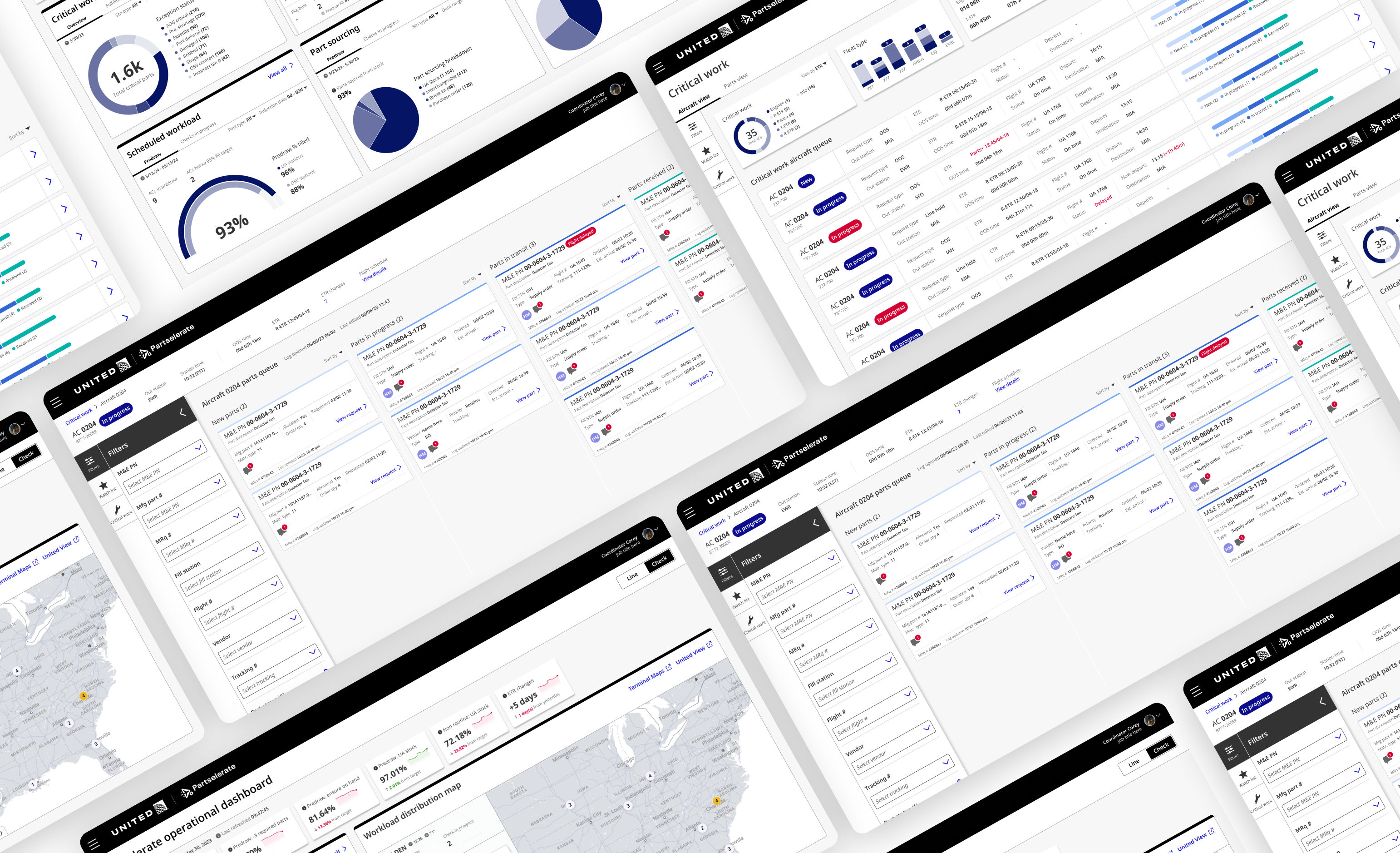
Partselerate consolidates all existing applications into one rule-based, role-adaptive platform. The ordering flow collapsed from 8+ steps to 3.
Dashboard mockup
Dashboard mockup

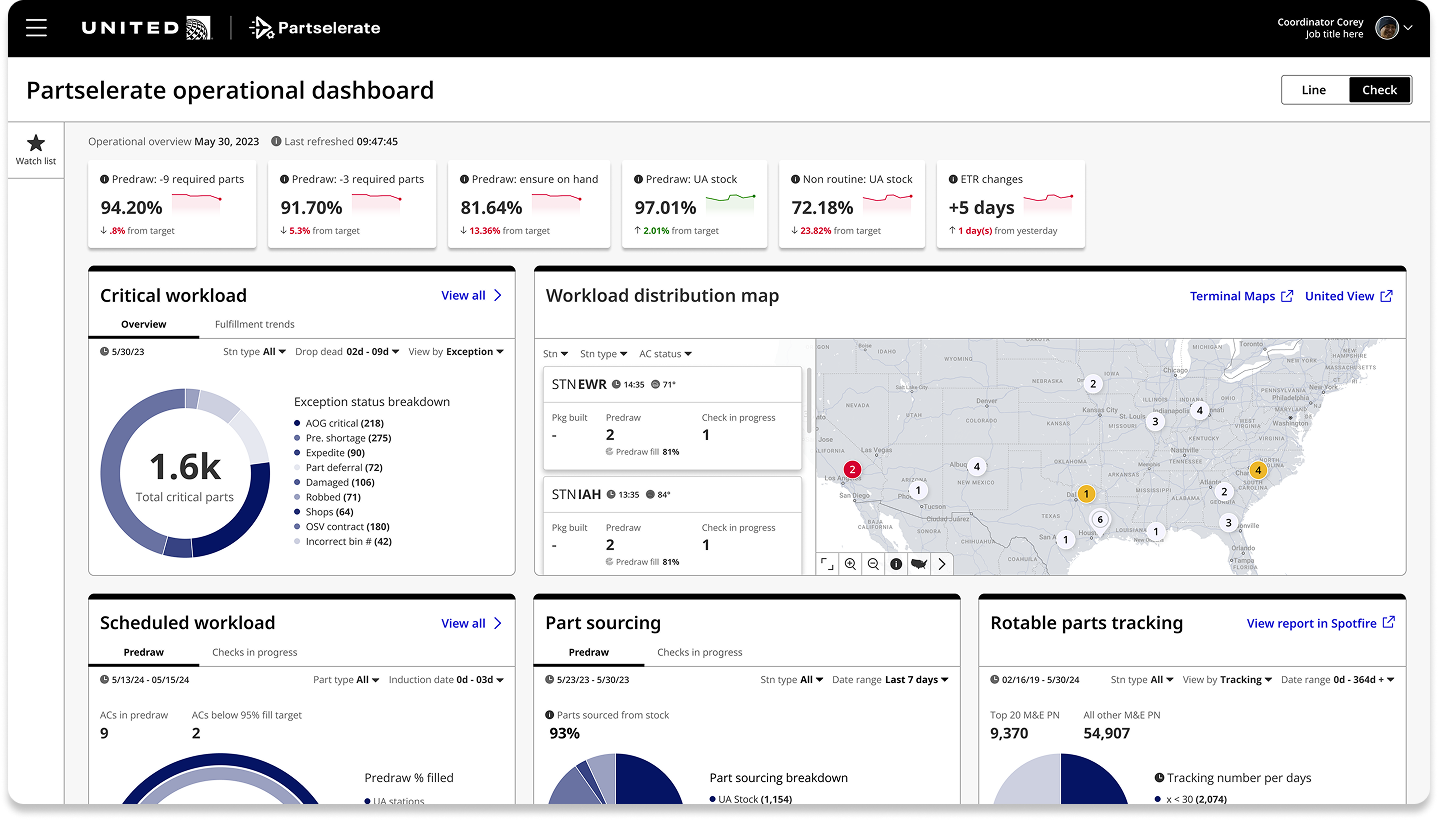
Operational dashboard

Individual controllers needed a tool to manage their queue. Managers needed something different: a way to see across the entire operation, spot where resources were stretched, and intervene before delays compounded.

Role-adaptive layout

The dashboard automatically configures to the user's role. Managers see cross-team workload distribution, exception counts by station, and sourcing performance trends.

Exception prioritization

Rather than surfacing all activity equally, the dashboard leads with exceptions: parts at risk, stations below fill-rate targets, ETR changes. Managers don't need to see what's going well, they need to know where to intervene.

Workload distribution map

A geographic view of active workload across United's station network, giving operations leadership visibility into where capacity is concentrated and where delays are likely to cascade.

Dashboard mockup

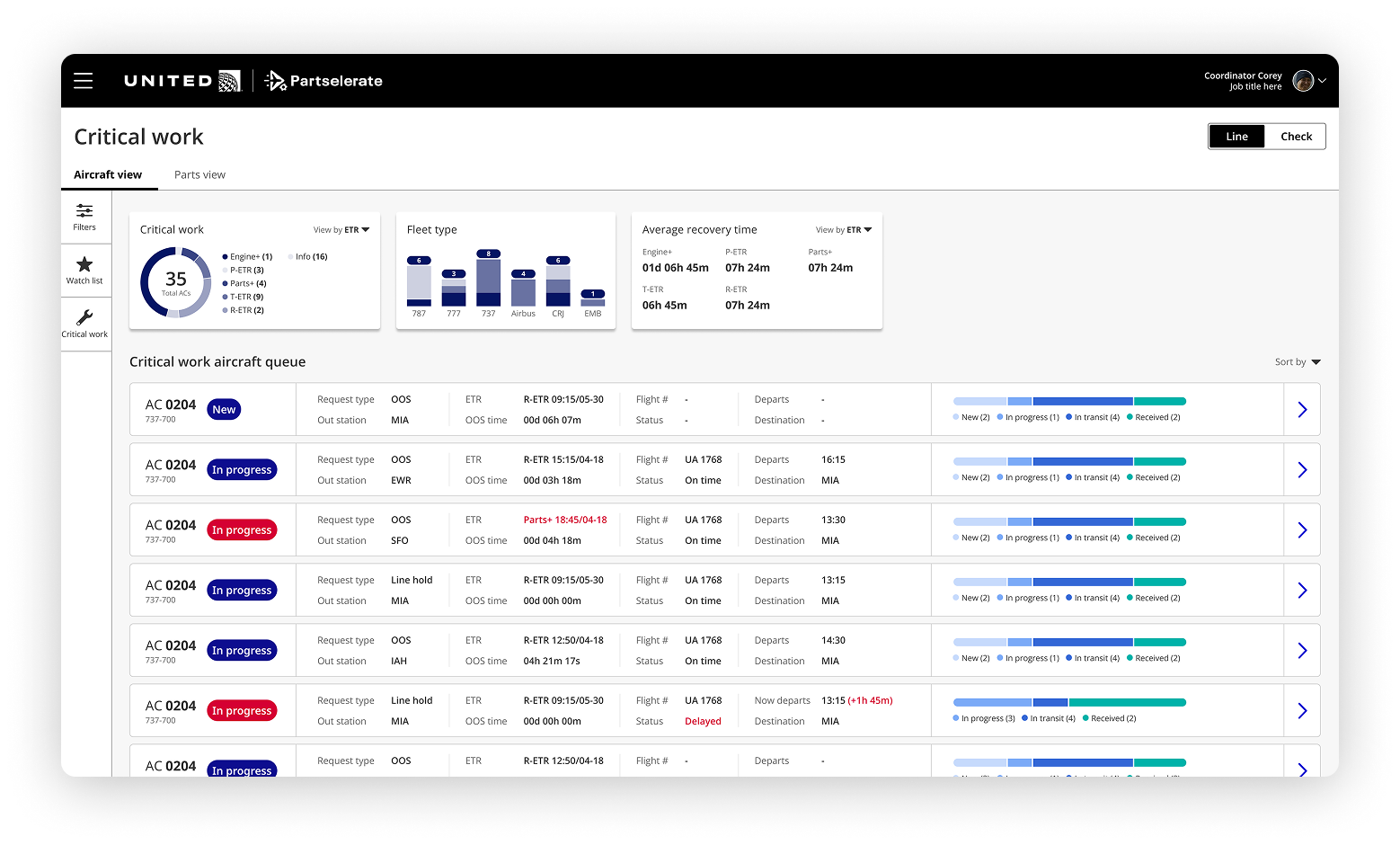
Aircraft queue view

The queue is the starting point for every shift. Controllers need to know immediately which aircraft need attention, what type of work is required, and how much time is left before a flight impact. The aircraft queue surfaces all of that in a filterable, role-specific list — so time at the start of a shift isn't spent assembling a picture of the day's work.

Role-adaptive filtering

Depending on the user type - the queue auto-filters to the controller's assigned work type. For example: A coordinator responsible for narrow-body fleets sees their queue immediately, not a full list they have to manually filter down every morning.

Performance metrics

Key metrics surface above the queue so controllers can gauge their day's performance at a glance without leaving the tool.

Exception flagging

Aircraft with delayed status or missed ETR targets are flagged inline in the queue, so high-priority cases surface naturally rather than requiring a separate report or manager escalation.

Dashboard mockup

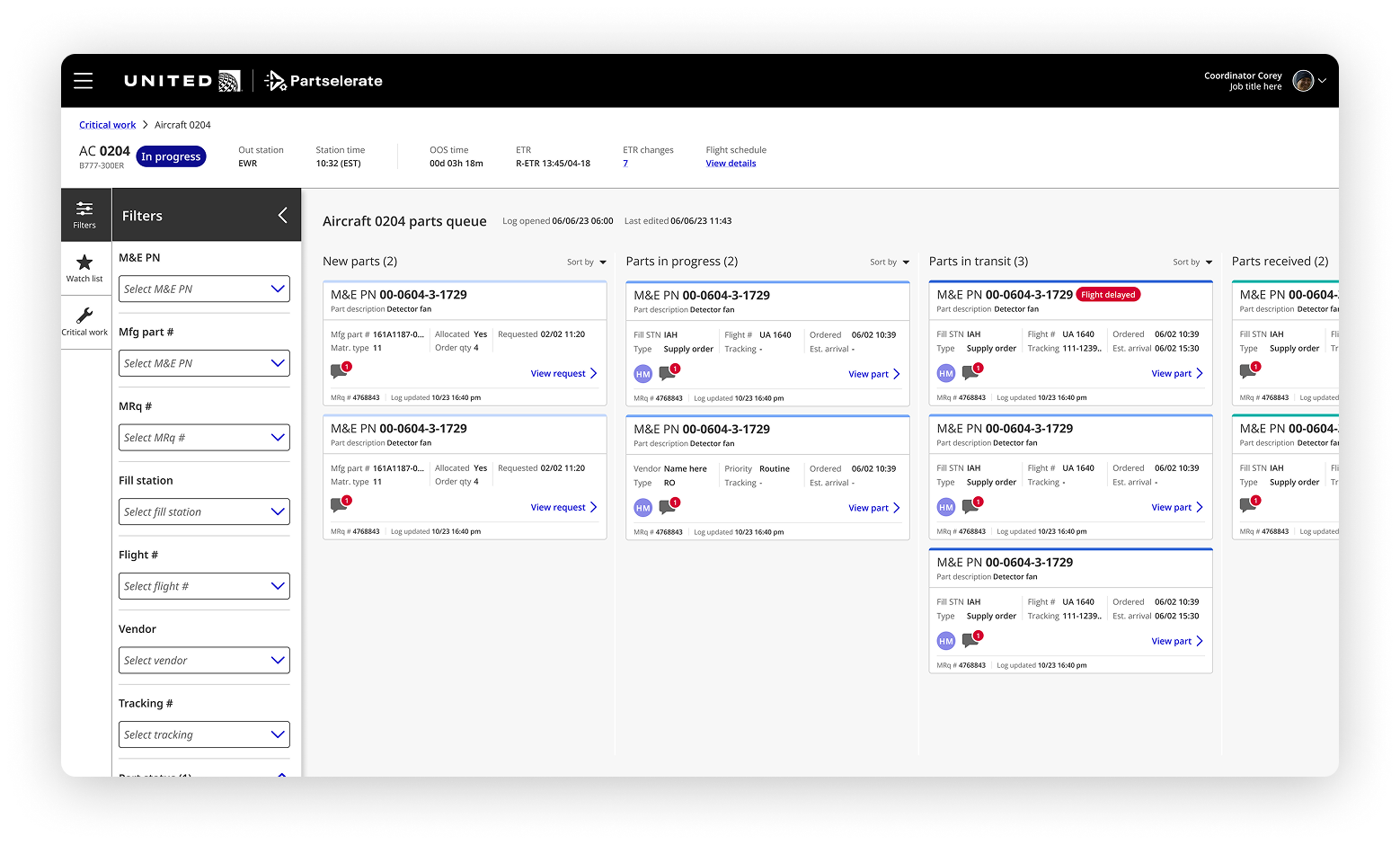
Part tracking kanban

With parts spread across multiple stations, flights, and fulfillment stages, the hardest problem wasn't ordering — it was knowing what was happening at any given moment. The kanban board gives controllers a single, real-time view of every part associated with an aircraft log, organized by fulfillment status so attention goes where it's needed most.

Part status queue

Parts move through four states — new, in progress, in transit, received — surfaced as kanban columns so controllers can instantly see where bottlenecks are forming without opening a single additional tool.

Status tagging

Color-coded status chips flag parts that require immediate attention — overdue requests, delayed shipments, missing tracking numbers — so critical issues don't get buried in a long list of routine orders.

Dashboard mockup

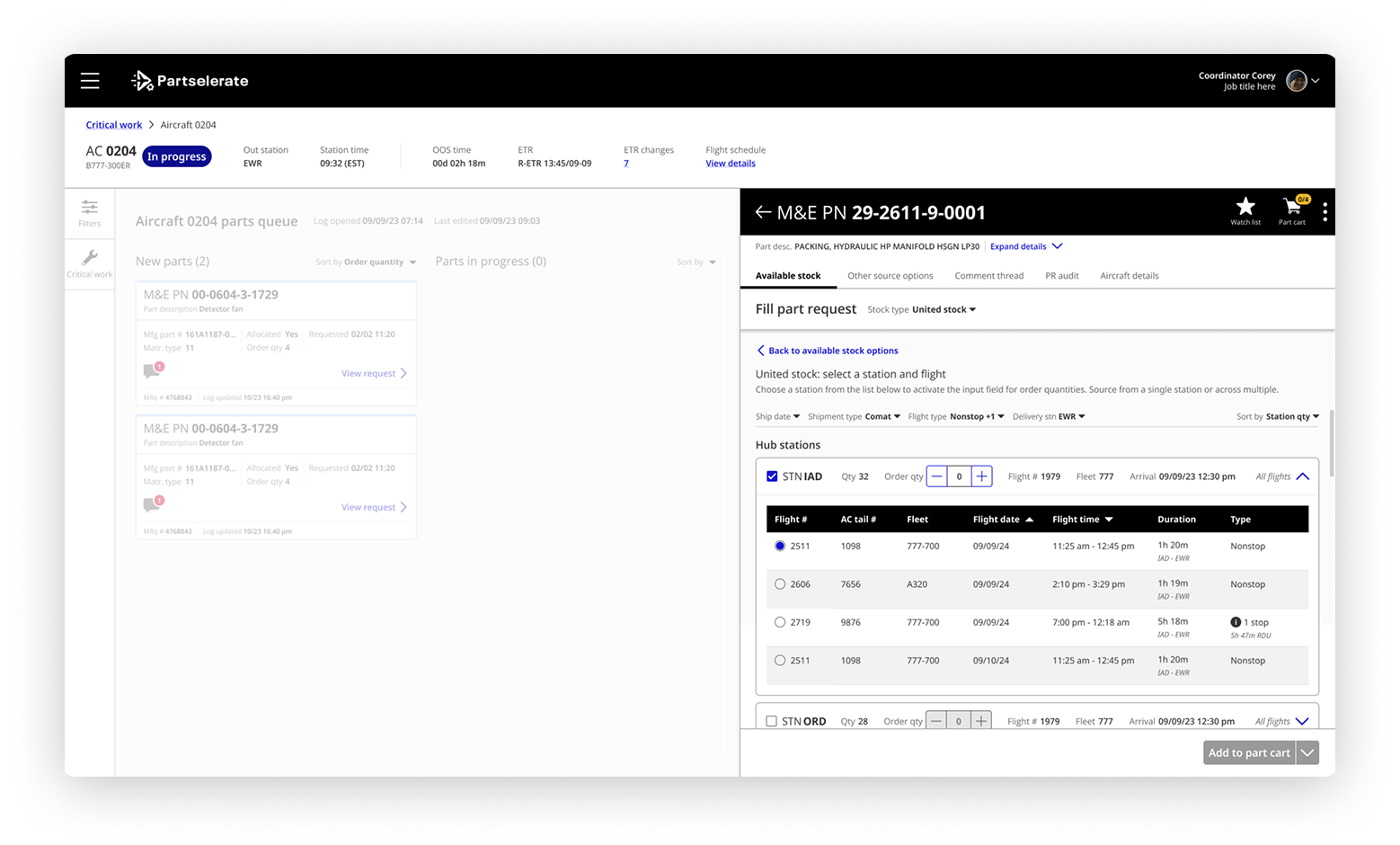
Part request drawer

Before Partselerate, fulfilling a single part request meant switching between systems to check availability, comparing fulfillment options, and submitting an order form — with data manually re-entered at each step. The part panel collapses that entire workflow into a single slide-out view.

Sourcing options in one place

All available sourcing options for a part  are surfaced side by side, so controllers can compare and select the best option, without leaving the system.

Recommended routing

The system analyzes available flights and recommends the best routing to get the part to the station based on the user groups preference – for example, if you're working an out-of-service it will sort and pre-select the flight that arrives first.

Pre-populated order fields

Part details, flight information, and station data are automatically carried into the order form. Controllers review and submit — eliminating the copy-paste loop.

Dashboard mockup

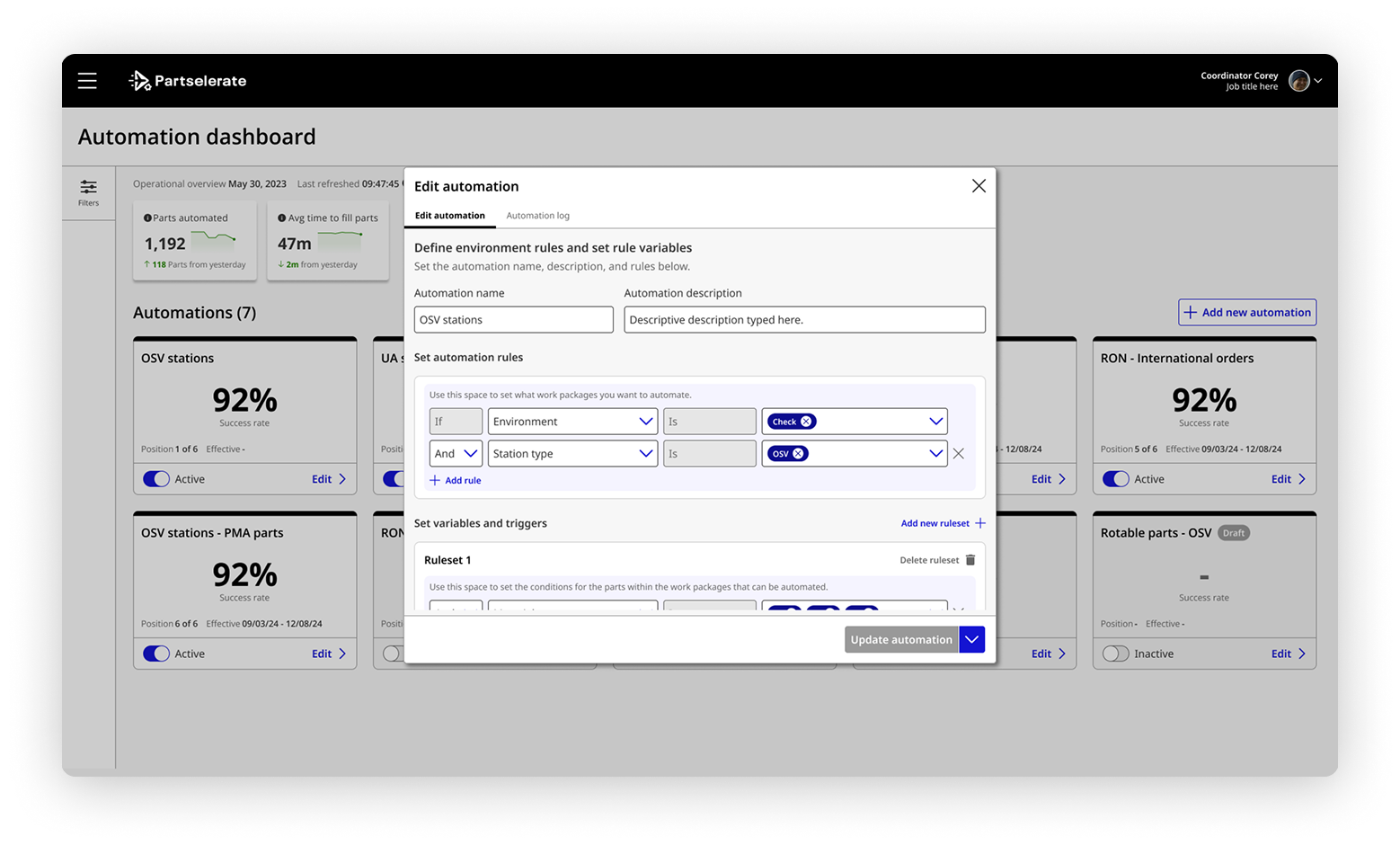
Automation + Prioritization

Not every part order needs a human decision. Routine requests, such as parts available at the requesting station, were consuming coordinator time that was better spent on complex, exception-based cases. The automation engine lets teams define their own fulfillment rules, then handles routine orders automatically.

Configurable rule sets

Managers can define automation rules by environment, station type, order priority, and supply conditions. Rules are set through a structured editor designed to be intuitive for operation managers to create rule-sets on their own.

Inventory and routing logic

The engine checks stock availability, identifies warehouses with both available inventory and qualified staff, and selects the best flight routing. Only escalating to a coordinator when conditions fall outside the defined rules.

Priority ordering

Automation respects order priority, out-of-service parts are filled before scheduled maintenance parts, regardless of submission time. All other orders will rise in priority based on the: maintenance type, scheduled routing time (aircraft's next scheduled flight), and available routing, ensuring that orders do not become stale.

07 - metrics

How did we do?

Partselerate launched in May 2025. Two years in the making, the reception has been strong — and the numbers reflect a genuine behavior change, not just a faster version of the old workflow.

20+ → 1

From multiple tools for part sourcing to one
streamlined solution for all aircraft events.

8+ → 3

From 8+ steps across multiple
tools to just 3 steps
in one application to
complete a part transaction.

10m → 2m

The average time to place an
order went from
10 minutes to
2 minutes and 30 seconds.

But the metrics only tell part of the story. What they don't capture is the shift in how controllers experience the work:

“It’s incredibly straightforward, it makes it very easy, and does a lot of the work for me.”

- AOG Aircraft controller, post-launch feedback


“we can now access multiple tools that we use everyday from a single portal instead of logging into multiple application. This saves us a lot of space on the screen. We can now focus more on sourcing the part than sending out emails and making data entries.”

- Base Aircraft controller, post-launch feedback


“ I timed how long it took my colleague to find out 3 items were non-stock when I knew instantly using partselerate”

- AOG Aircraft controller, post-launch feedback